

Delegate context collection to your AI agent
Connect Cursor, GitHub Copilot, or Claude Code to Crowdin with a single command. Your agent collects context from your codebase and syncs precise string descriptions back to Crowdin – no manual typing, no custom scripts.
Your translators are guessing – and it shows
| Klíč | zdrojový řetězec | Translation (de) | Kontext |
|---|---|---|---|
| editor.toolbar.post | Post | Beitrag? Veröffentlichen? | Missing |
| task.actions.run | Run | Ausführen? Laufen? | Missing |
| profile.form.name | Name | Name? Benennen? | Missing |
- Short UI strings like "Post" or "Run" cause frequent translation errors when translators lack context.
- Guessing leads to mistranslated buttons, broken layouts, and slow QA review cycles.
- Manually writing descriptions or maintaining extraction scripts doesn't scale.
There's a better way: delegate context collection.
The AI agent already sitting in your IDE has full access to your codebase. With Crowdin Skills and the Crowdin CLI, it can read your components at the AST level, see exactly where each key renders, write a precise description, and push it to Crowdin – autonomously.
Your code stays yours – it's read by your own agent, which already has access to it.
Only the extracted context descriptions ever reach Crowdin.
Collection runs locally on your existing agent plan – the only cost is the tokens your agent spends.
From zero context to full coverage in two steps
No dashboards to configure. No scripts to maintain. Just your terminal, your agent, the Crowdin CLI – and a Crowdin account where your strings live.
Equip your agent with Crowdin Skills
Run one command in your project root:
npx skills add crowdin/skillsThis installs two skills that teach your AI agent everything it needs:
crowdin-cli– how to use the Crowdin CLI, including the context commands (context download,context upload), and read/write Crowdin's line-delimited JSONL format.context-extraction– the engineering rules for good context: which strings need attention (short ambiguous words, labels, buttons) and how to write concise 1–3 sentence descriptions of exact UI placement.
Works with the agent you already use
- Claude Code
- Cursor
- OpenAI Codex
- Gemini CLI
- GitHub Copilot
- Windsurf
- Cline
- OpenCode
And other agents supporting the Agent Skills format.
Give one prompt. The agent handles the lifecycle.
You never have to run the CLI manually. Prompt your agent:
Use the Crowdin CLI to download strings that are missing context, enrich them with precise UI placement descriptions based on our codebase, and upload the enriched context back to Crowdin.Behind the scenes, the agent:
crowdin context download --status emptyIt fetches only the strings missing descriptions into a local
crowdin-context.jsonl, then analyzes your source code – component by component, at the AST level – to determine where each key actually renders, and writes a 1–3 sentence placement description for every one.Every description lands in a local file first – review or edit any of them before they're uploaded to Crowdin.
crowdin context uploadThe enriched context lands in your Crowdin project instantly – visible to every translator and every AI translation engine from the next string they touch.
From here, your strings are ready for the AI localization pipeline in Crowdin:
AI auto-translationWatch progressControl token spendReview onlinecrowdin downloadShipped a major UI update? Re-run the same prompt any time – your agent refreshes the descriptions, so the context never goes stale.
Precision context, zero overhead
Audit context health from your terminal
Get a birds-eye view of project readiness in one command:
Append --by-file to pinpoint exactly which directories or feature modules still need attention.
$ crowdin context status
Context Status for Project "App Workspace" (ID: 78910)

Total strings:       3484
With AI context:     2850 (81.80%)
Without AI context:   634 (18.20%)
With manual context:    0 (0.00%)
Zero manual context typing
Your agent writes and maintains descriptions for thousands of keys while you ship features. No spreadsheets, no annotation sessions.
End the Q&A loop
Translators see where every string lives before they ask. Fewer clarification tickets, fewer broken layouts.
Feed AI translation engines what they can't guess
AI can't infer intent from "Run" alone. Code-level context is the fastest way to drive AI translation errors toward zero.
Changed your UI? Reset safely. Wipe AI-generated descriptions while preserving human-written notes:
crowdin context reset --allAll that context lands in the Editor
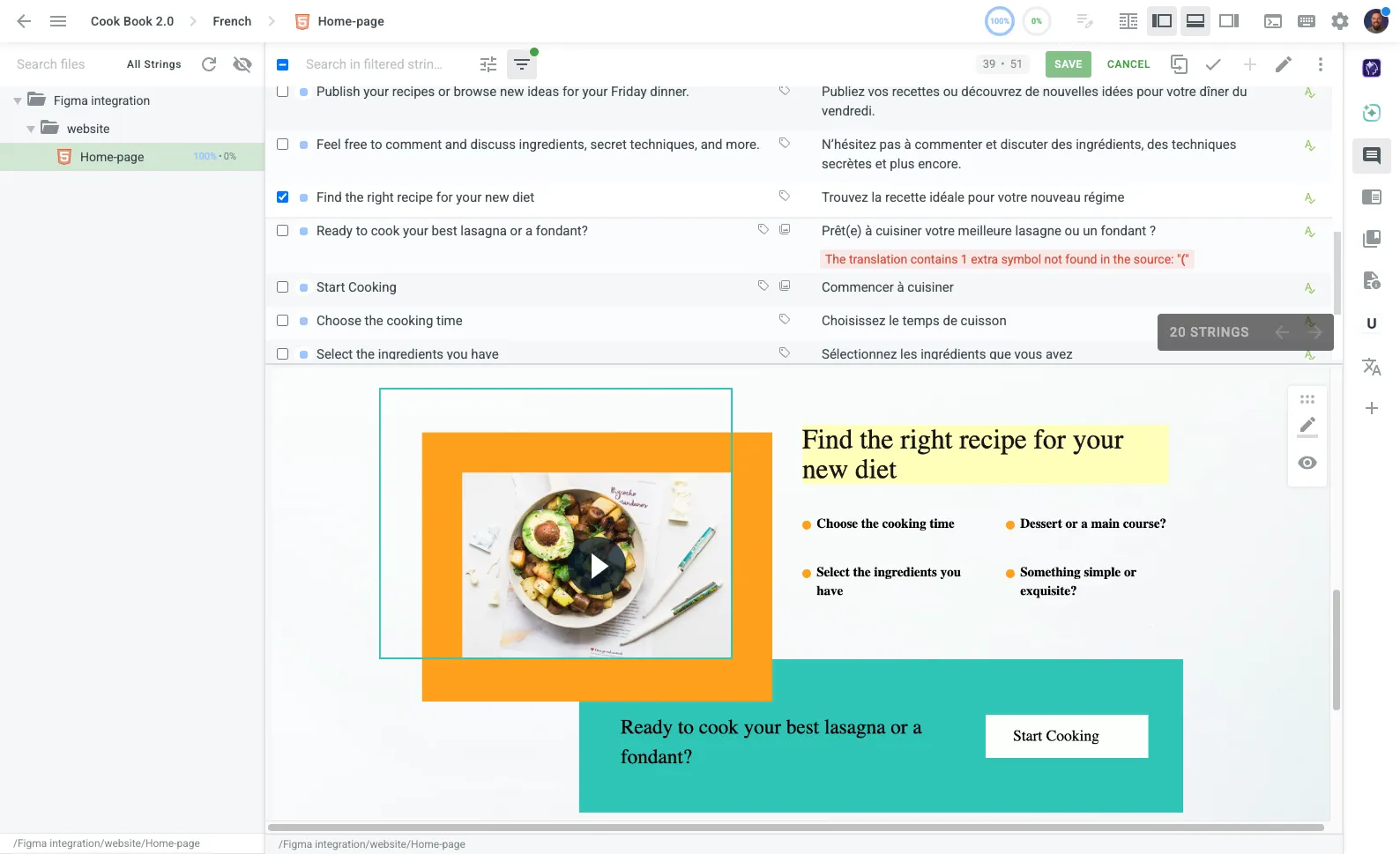
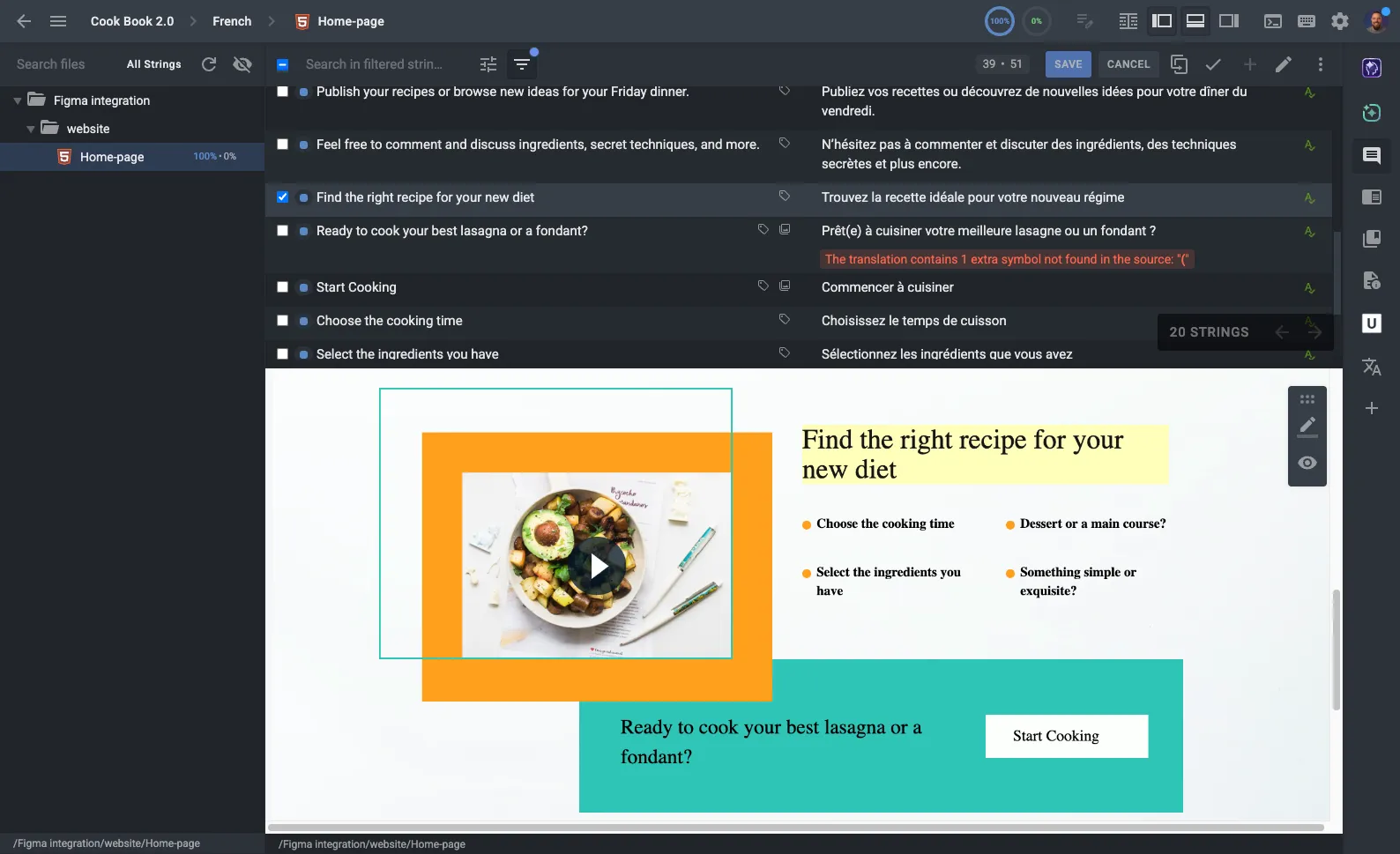
Every description your agent uploads appears in the Crowdin Editor, right next to the string it explains. The same context guides both the people and the AI translating your product.
For people: Translators see the description and exact UI placement while they work – no guessing, no back-and-forth.
For AI: The same descriptions are fed to AI engines with every auto-translation prompt.
One platform.Every layer of context.
AI agents are the fastest way to generate context at scale – but they're one part of a complete context ecosystem. Combine them with visual, in-app, and collaborative context to give translators the full picture.
In-Context Editor
Translate directly on your live web app. Translators see every string exactly where users will – in the real layout, with real data – and edit it in place.
Snímky obrazovky
Upload UI screenshots and Crowdin automatically maps strings to them with OCR. Every translator sees the screen a string belongs to, without leaving the editor.
Design Plugins
Push visual context straight from Figma, Sketch, or Adobe XD. Designs and copy stay in sync from the first mockup – before a single line of code ships.
String Descriptions & Labels
Add manual descriptions, character limits, and labels to any string. Ideal for edge cases, brand terminology, and keys that need a human note alongside AI-generated context.
Comments & Mentions
When questions do come up, resolve them where the work happens. Translators flag issues on specific strings, mention teammates, and get answers – with a full audit trail.
Glossaries & Style Guides
Define key terms and attach style guides so tone, voice, and terminology stay consistent – for every translator and every AI engine.

Automate your localization context today
Equip your agent with Crowdin Skills once – and every release ships with the context your translators and AI engines need to get it right.